Business / Department Email Account Request Guide
/ 1 min read
Table of Contents
Introduction
Teams and departments may require a shared email account for business communication, accessible by multiple members. You can request such an account through the internal approval system.
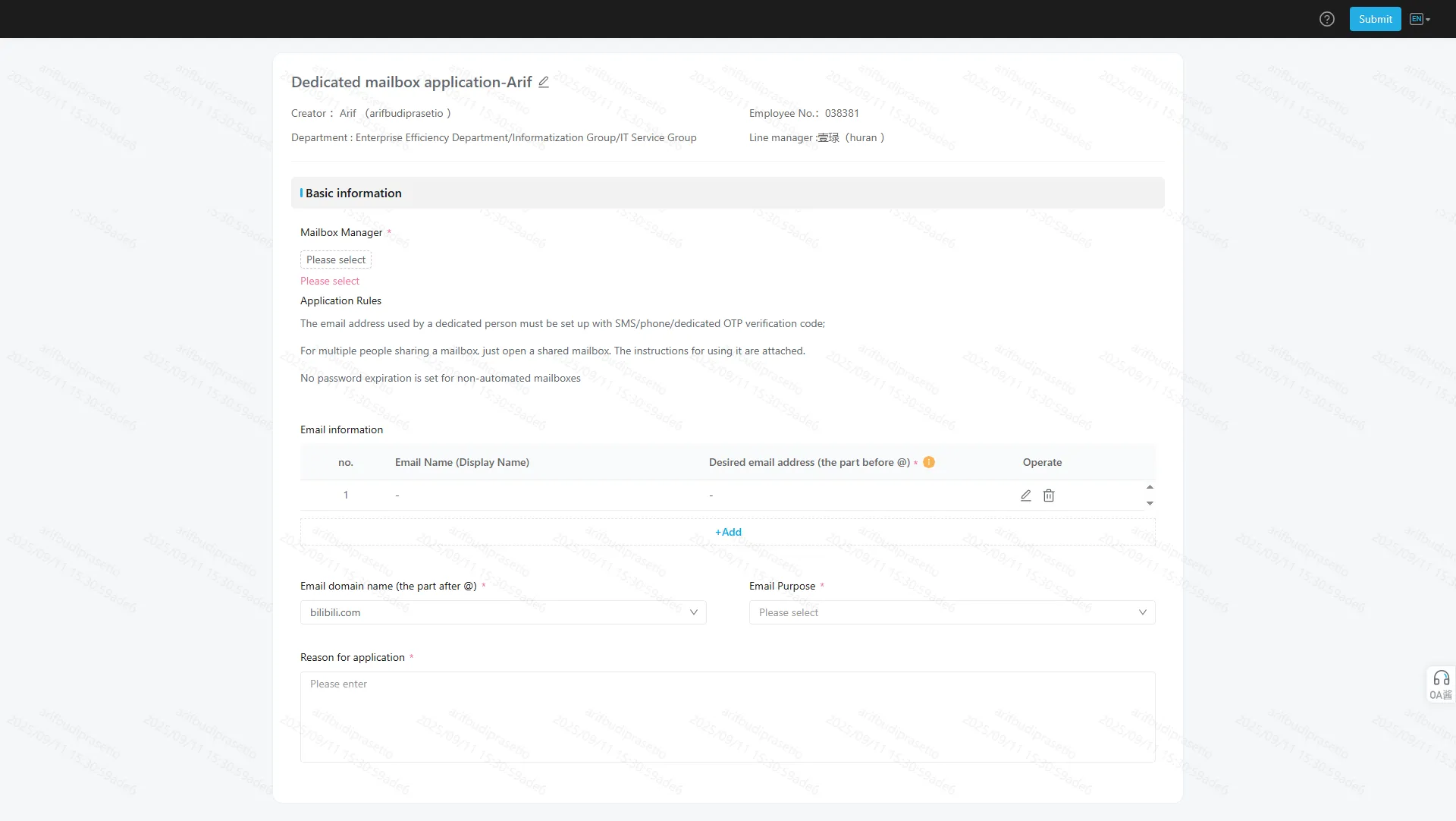
How to Apply
-
Open the Request Link
Visit the request form at:
Department Email Account Form -
Fill in the Required Information
Complete the form with the following details:- Mailbox Manager:
- Can be a dedicated person (requires SMS/Phone/OTP verification), or
- Multiple people sharing the mailbox.
- Desired Email Address and Domain (choose from the listed domains).
- Email Purpose: Describe how the mailbox will be used.
- Reason for Application: Provide justification for creating the shared mailbox.
- Mailbox Manager:
-
Submit the Form
After filling in the details, submit the request for approval.
Approval Process
- The request will go through the standard internal approval flow.
- Once approved, the shared mailbox will be created and ready for use by your department/team.
Notes
- Make sure to assign a responsible Mailbox Manager to oversee access and security.
- For multiple users, ensure clear guidelines are set on who can access and manage the account.
- SMS/Phone/OTP verification is required for mailbox manager setup.
By following these steps, your department can efficiently request and manage a shared email account for collaborative use.